Animatronic Boobs

Liven up your workspace with Jingle Jugs, the animatronic singing and dancing boobs.


The Jingle Jugs™ make a perfect gag gift. They're a must have in the game room or in the bar. Put 'em in your home office or garage and liven up your workspace. Put a new top on 'em to match the season. Mount 'em next to your trophies in the game room - after all, it's the Trophy Rack He's Always Wanted! Leave 'em on "Motion Detect Mode" and startle visitors when they jiggle and dance to "Titties & Beer." The opportunities for laughter and fun are endless with Jingle Jugs!

The Jugs are manufactured with high quality components. You can either install batteries in them or use the included AC Adapter. Jingle Jugs are easily mountable on the wall or you can use the included stand to put them on a flat surface, like the Thanksgiving table centerpiece. The motion sensor, if activated, will respond to any changes in light - someone walking by, for example!
Jingle jugs are available from Baron Bob.com.

Sailing Simulator Software

Are you looking for Sailing Simulator Software?

Posey Yacht Design offers five different simulators:

  • Advanced Racing Simulator - For Windows 95 or better and Macintosh OS X Power PC and Intel-based Macintosh.
    Now with option to create your own Personal Race Area as well as twelve, popular real-world racing areas.
    Experience high-level racing from the skipper’s perspective in an intelligent 20-boat fleet. 25 different boat types, including New 25 foot Sport Boats, 35 foot Sport Boats, Ideal 18s, and Offshore Catamarans.
    Very realistic boat response to your sail trim, weight placement, steering, and boatspeed adjustments.
    Interactive, animated tutorials teach Racing Rules, racing tactics and strategy.
  • Sailing Tactics Simulator - For Windows 95 or better and Macintosh OS X Power PC and Intel-based Macintosh.
    Now with option to create your own Personal Race Area as well as eighteen, popular real-world racing areas.
    One or two players can match wits against each other, the computer’s expert match racer, or a fleet of 30 aggressively sailed boats.
    25 different boat types, including New 25 foot Sport Boats, 35 foot Sport Boats, Ideal 18s, and Offshore Catamarans.
    Interactive, animated tutorials teach the latest Racing Rules, racing tactics and strategy.
  • Distance Race Sailing Challenge - For Windows 95 or better and Macintosh OS X Power PC and Intel-based Macintosh.
    Compete in 11 different distance races, including Chicago to Mackinac, Vineyard, Chesapeake Governors Cup, Ft. Lauderdale to Key West.
    Emphasis on strategy and boatspeed. Sail in a 20 boat fleet of offshore racers, sprit boats, racer-cruisers, or catamarans, plus high performance ultra light sportboats.
  • Sailing Dynamics Instructor - For Windows 95 or better and Macintosh OS X Power PC and Intel-based Macintosh.
    Novice and intermediate sailors can learn the fundamentals of sailing, rules of the road, and fine points of sail trim. As you build skills, progress to racing basics. Practice sail shaping and boat handling techniques.
    Brush up on the latest Racing Rules. Includes expanded interactive sailing skill and racing tutorials, sailing simulator, and racing simulator.
    Sail Optimists, catamarans, skiffs, dinghies, keelboats, cruising sloops, and offshore racers, plus high performance offshore catamarans and ultra light sport boats.
  • Coastal Cruising Simulator -
    For Windows 95 or better and Macintosh OS X Power PC and Intel-based Macintosh.
    Practice essential cruising skills as you enjoy up to a five-day cruise or passage in a wide variety of cruising grounds.
    Captain monohulls, multihulls, motorsailers, or trawler yachts.
    Navigate using modern equipment or dead reckoning. Docking Practice Simulation included.

You use the keyboard or mouse to operate the simulation boat.

All software runs on Windows 95 + systems and Macintosh Native OS X and Classic versions.


More Info:
Posey Yacht Design

New Generation of Digital Stethoscopes

The ultimate in stethoscope sound quality.
Adjust volume for faint heart sounds, obese patients, noisy work environments, etc.

It will greatly improve the diagnosis of sublte murmurs, or taking blood pressure.

Suitable for students or academic research recordings, the ds32a sets new standards in electronic stethoscope audio quality and ease-of-use.


Capturing the Sound - The Electromagnetic Diaphragm (EmD)
Capturing heart and lung sounds is the most critical aspect of stethoscope design.
Acquire the sound accurately, and anything is possible.
The patented Electromagnetic Diaphragm (EmD) is unique to a Thinklabs stethoscope, and is the key to audio quality.

Audio Transmission 100% End-to-End Electronics
Having captured an accurate signal, electronic signal transmission right to the eartips ensures crisp clear sound.
A simple experiment with your conventional stethoscope shows you why you need End-to-End Electronics.


More Info:
Thinklabs

iTech Virtual Laser Keyboard

iTech Virtual Laser Keyboard


In the size of a Zipo lighter and in an outer spaced "enterprise" style, the iTech Virtual Laser Keyboard uses a laser beam to generate a full-size OPERATING laser keyboard that smoothly connects to MAC's, Smart Phones, the new Blackberry (8100,8300,8800), Any kind of PC and Most of the handheld devices (PDA's, tablet PC's).

The I-Tech laser keyboard acts exactly like any other "ordinary" keyboard: A direction technology based on an optical recognition mechanism enables the user to tap on the projected key images, while producing real tapping sounds.

In this video Brian West shows Sean McHose the bluetooth iTech Virtual Laser Keyboard.


<

CD Library II

At Fox 7's "Inspector Gadget", Brian West shows Sean McHose how to take charge of his CD/DVD collection with the CD Library II from Dacal.

Connect this USB library to your Windows compatible computer, load the software, enter the names of the CD/DVDS, insert them into the carousel and you now have an automated system that can quickly find any CD/DVD in your collection.


Infrared Marine Thermometer

Infrared Marine Thermometer
Did you know that most water temperature meters take up to 1 minute to give you an accurate reading?
How are you going to pinpoint the optimal temperature habitat for your prey with a 1 minute delay?

The NorCross® Infrared Marine Thermometer SP delivers instant temperature readings of any surface with one-handed operation.
Use it to:
  • Take water temperature readings while racing to the fishing grounds; no matter how fast you’re running. Instantly measure powerhead, riser, block, etc. temperatures or pinpoint water circulation problems.
  • Check the bearing and brake temperatures of your trailer and avoid the unwanted hassles of improper lubrication or failed seals.
Take it with you no matter where you go and don’t worry, it’s made marine-proof and water resistant.

To Use: Just aim at the target with the integrated laser pointer and press the measure button. Temperature readings will appears within a ½ second and will continue to update 4 times per second until the button is released

Available from:
NorCross

The Loremo

Loremo
German Loremo AG introduced their ultra efficient car at the 76th annual Motor Show 2006 in Geneva last month, the Loremo.
Founded in Munich in 2000, Loremo AG is a German automaker corporation, focused on designing and manufacturing cars with very low weight and air resistance. The term "Loremo" is an abbreviation for Low Resistance Mobile.

The company has developed a light-weight passenger car with outstanding erodynamics. The one, two combination of light weight and tunnel tested aerodynamics allow this energy-efficient car to travel 157 miles per gallon of gasoline or 1.5 l per 100km.

The idea is simple: Weight and aerodynamic resistance have fundamental influence on the fuel consumption of vehicles. Reducing these factors reduces the consumption rates. This fact is known from motor sports, where the main focus lies on the weight reduction. Therefore the secret of Loremo is concentration on the essential: Safety, economy, driving pleasure and design.

The innovative linear cell structure is the basis of Loremo’s safety. Instead of two doors on the side there is a “gate”. A wing door that swings upward and to the front. The gate also reveals a baggage compartment where you can find additional room.
And in case you need to transport something larger, the huge rear trunk offers lots of space. You can also quickly make room for two children by folding back the two rear seats.

The ergonomically designed interior makes a clear statement: concentration on the essential, transferred with elaborate design, style and pleasant feel.

The dashboard yields a simplistic instrument tower with display.
The bucket seats are only vertically adjustable.
Instead of a horizontal adjustment of the seats the pedals and steering wheel are adjustable to ergonomically suit the driver.
The rear seats are arranged against driving direction and provide a high safety standard for children.


LOREMO LS LOREMO GT
Engine 2-Cylinder-Turbo-Diesel 3-Cylinder-Turbo-Diesel
Output 15 kW / 20 HP 36 kW / 50 HP
V max 160 km/h 200 km/h
Acceleration <> <>
Gearbox 5-gear-manual / automatic 5-gear-manual / automatic
Drive Mid engine / Rear wheel drive
Mid engine / Rear wheel drive
Fuel consumption
<> <>
Range > 1.000 km (20-l-Tank) > 700 km (20-l-Tank)
Weight <> <>
Aerdynamic drag Cw=0,22 Cw=0,22
Seating 2+2 2+2
Measurements (l x w x h) 380 cm x 136 cm x 114 cm 380 cm x 136 cm x 114 cm
Price <> <>
Standard equipment
Airbags, particulate filter, radio
Optional equipment
On-Board-PC, A/C, MP3-Player,
Navigation system
On-Board-PC, A/C, MP3-Player,
Navigation system


The Loremo

Delicious Library

By Wei-Meng Lee

If you are a book-lover (or a DVD collector) like me, you would no doubt have a huge collection of books. The problem that most people encounter is how to really organize their collections. People in the early days use spreadsheets to keep track of what titles they have, but doing so is really a hassle as you have to key in all the data yourself.

Recently I came across a very cool cataloguing application that prompted me to revisit my desire to organize my home library again. And so, in this article I am going to walk you through the Delicious Library application ($39.95) from Delicious Monster (http://www.delicious-monster.com/). Delicious Library is a Mac OS X application that catalogues your personal collection of books, DVDs, CDs, and games. It does so by scanning the barcode of the item and then access the Amazon.com web service to fetch the detail information of the item.

Barcoding Scanning using your iSight or Webcam

The first thing that the Delicious Library really impresses me was its ability to scan in barcodes using your iSight camera. However, if you do not have an iSight camera, fret not. You can still use your Webcam to scan in barcodes. You would however need to do some work to get your Webcam to work in Mac OS X (refer to my earlier article at http://www.macdevcenter.com/pub/a/mac/2003/12/23/usb_webcam.html on how to do this).

Once Delicious Library is installed, click on the Video Barcode Scanner button (see Figure 1) located at the bottom of the screen to start scanning your items!
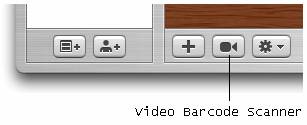
Figure 1. Click on the Video Barcode Scanner to start scanning your item

The first time you try to scan in a barcode requires some effort. For me, I placed the Webcam on the desk and held the item upright (in this case a book; see Figure 2). The trick to getting the book scanned is to do this in a brightly lit place and make sure that you keep your book still in order for the barcode to be captured successfully.
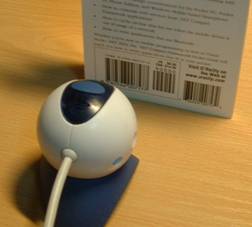
Figure 2. Scanning a barcode using the webcam

Ensure that your barcode is crossed by at least one of the red lines (see Figure 3). If you hear a beep sound, then the barcode is scanned successfully.

Figure 3. Scanning a barcode

Once the barcode is scanned, the Delicious Library will query the Amazon.com web service for the details of the item. As the querying may take some time, you can continue scanning other items while it is waiting for the result of the last query (see Figure 4).
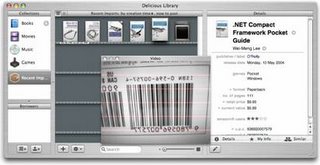
Figure 4. Fetching the information of an item from Amazon.com

Overall, I find the scanning very fun once you mastered the scanning process. However, there are at times where I had difficulty in scanning some books. If you do not have an iSight or a Webcam, I suggest you buy the Flic Bluetooth-enabled Scanner (see Figure 5) from Delicious Monster at a cost of $174.95 (when buying together with the Delicious Library license, which I think is a very reasonable price for a Bluetooth scanner). The best thing about using this scanner is that you can scan your books by going to them, rather than bringing all the books to the desk. This is especially useful if you have a large library and removing them from the shelves is too cumbersome. What’s more, even if you wandered beyond the 10 meters radius imposed by Bluetooth technology, the scanner has built-in memory enough to capture 500 barcodes which you can import into the Delicious Library when you are back to your desk.
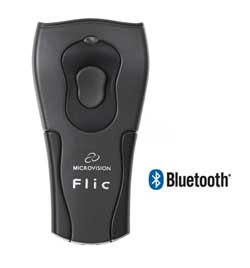
Figure 5. Using the Flic scanner together with Delicious Library

Besides scanning, you can also enter items the traditional way using the keyboard. Click on the Add a new item button at the bottom of the screen (see Figure 6) to add a new item.
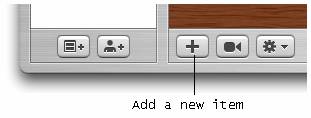
Figure 6. Adding a new item to your library

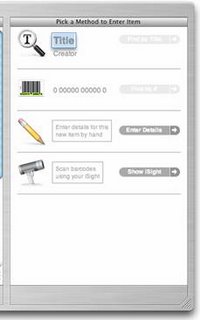
There are four methods for you to enter a new item (see Figure 7):

  • Search from Amazon.com

  • Enter the barcode of an item

  • Manually enter the item info

  • Scan using an iSight camera or Webcam

Figure 7. Various ways of adding an item

Searching for an item in Amazon.com is an easy way for you to add items to Delicious Library. Simply enter the title or/and author you want to search for and click on the Find by Title button located to its right (see Figure 8). When the result is returned, simply click on the “+” icon to add it to Delicious Library.
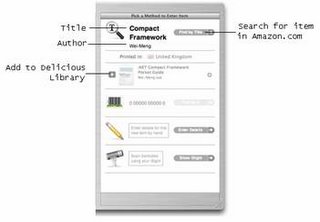
Figure 8. Searching for an item from Amazon.com

Once the items are scanned/entered, you can sort them according to a wide range of categories (see Figure 9). By default, the items are sorted by creator (e.g. authors).
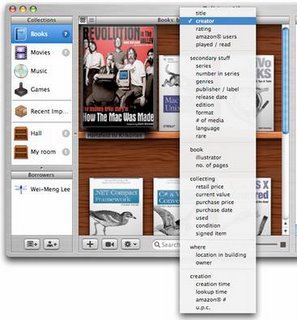
Figure 9. Sorting the items according to category

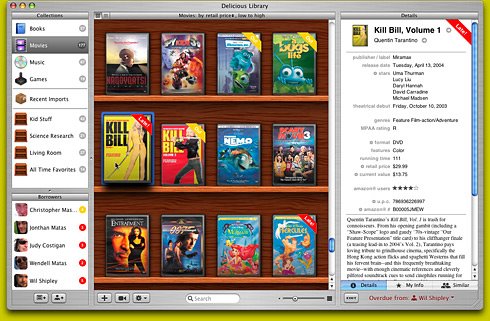
What made Delicious Library stand out from other application in the same genre is its amazing graphics effect. The cover image downloaded from Amazon.com is rendered to give it a realistic look, just like your real books (or DVDs) on the shelves. The Delicious Library can display your items (see Figure 10, 11 and 12) in a variety of sizes. The rendering of a DVD cover is most impressive (see Figure 12).
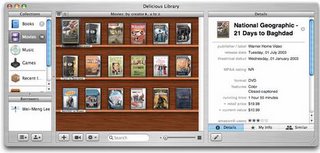
Figure 10. Displaying in the smallest size
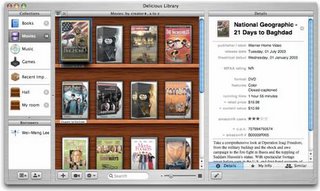
Figure 11. Displaying in small size
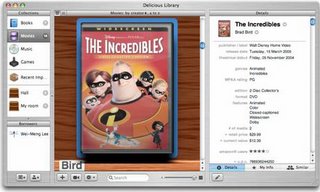
Figure 12. Displaying in the largest size

My only gripe with Delicious Library is that book covers are not displayed in the correct proportions. For example, the dimension of the book “Revolutions in the Valley” is 7.9x8, but Delicious Library displays it in the conventional rectangular format (see Figure 13), causing the image to be distorted. Also, sizes of all the books seem to be the same, which is definitely not the case in the real world. However, DVD does not face this problem as most DVDs are packaged in the same dimension.

You can also create virtual shelves that allow you to organize the location of your items. This is useful if you store your items in many different places, such as your study room, kitchen, etc.
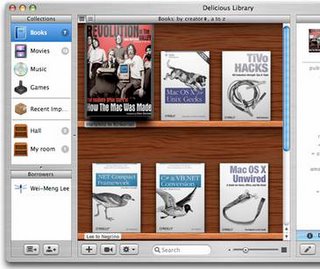
Figure 13. All the books are of the same size (the currently selected one is enlarged)

When you double-click on an item, you view an enlarged copy of its cover and on the right side of the window, there are three separate tabs:

  • Details – shows the detailed information of the selected item (see Figure 14).

  • My Info – allows you to enter your own comments pertaining to the selected item

  • Similar –explores other similar items from Amazon.com. You can purchase related items by clicking on the shopping cart icons next to each item (see Figure 15).

Figure 14. Viewing the details of a book
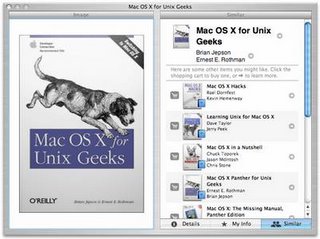
Figure 15. Viewing similar items

Another cool feature of the Delicious Library allows you to track borrower’s information. It integrates with Address Book to obtain user information. To indicate that an item is borrowed by a person, simply drag and drop the item onto the person’s name (see Figure 16). You can indicate the return date of the item by selecting the date on the right of the window (by default it is one week duration).

Figure 16. Tracking borrower’s information

When an item is overdue, it will be indicated on the book with a red stripe over the item (see Figure 17).
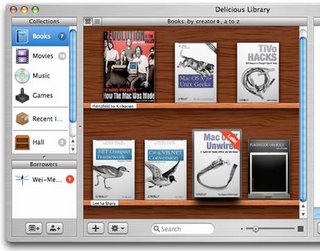
Figure 17. Late items are flagged

Final Thoughts

Overall, I like Delicious Library very much. It makes cataloguing your books and other collections such a fun thing to do. But what really makes the Delicious Library stand out is its innovative use of iSight (or Webcam) for barcode scanning, and its cool use of graphics really adds to the pleasure of using this application. Enough of this, I got to go and scan the rest of my library now!